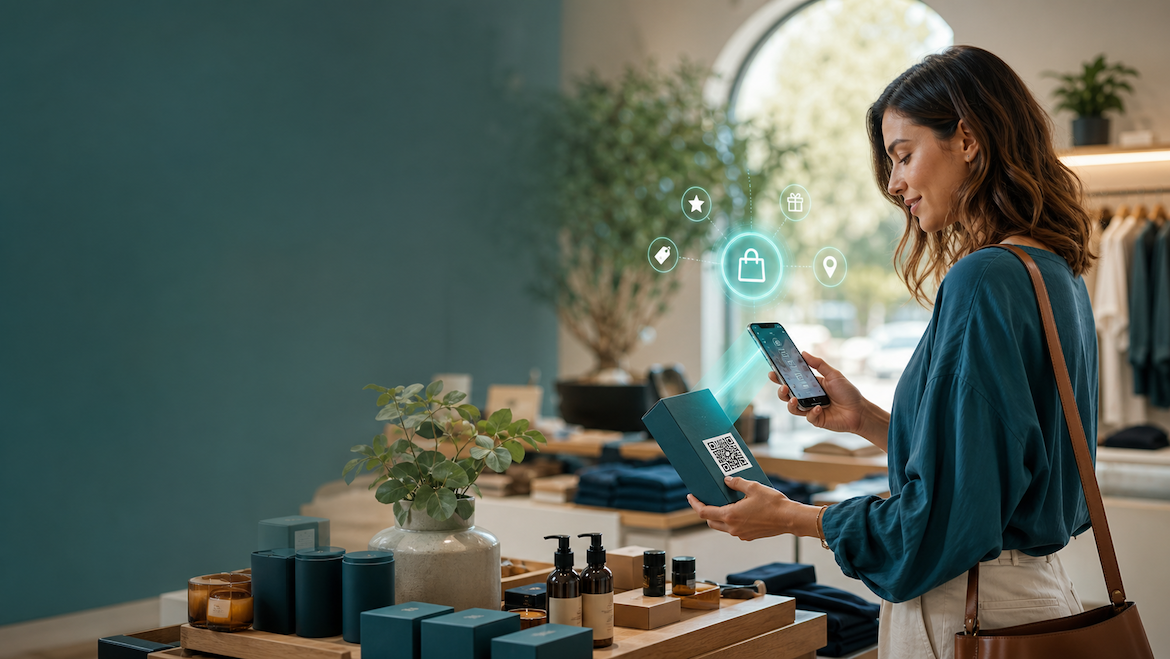
Discover five practical ways Australian retailers can use dynamic QR codes to build trust, capture leads, improve support, generate reviews and retarget shoppers in 2026.
A QR code on a restaurant table used to mean one thing: open the menu. In 2026, that tiny square can do much more. It can prove where a product came from, capture a customer before they leave the store, explain how to use an item, request feedback at the right moment and keep a seasonal campaign current long after the packaging has been printed.
That is the difference between a static QR code and a dynamic QR code. A static code sends people to one fixed destination. A dynamic code points to a managed link, so you can update the destination, measure scans and improve the customer journey without replacing every label, card or sign.
For Australian retailers and e-commerce brands, this creates a practical bridge between physical products and digital experiences. Here are five high-converting ways to use it.
1. Turn product proof into purchase confidence
Shoppers increasingly want more than a product name and a price. They want to know whether a product is Australian-made, responsibly sourced, recyclable or backed by credible standards.
Place a dynamic QR code on the product tag, shelf talker or packaging and send customers to a mobile-friendly product proof page containing:
- Australian-made or Australian-grown information where applicable.
- The maker’s story and location.
- Sourcing and supply-chain details.
- Sustainability claims, reports or certifications.
- Batch, care or recycling information.
The goal is not to overwhelm shoppers with a long corporate report. Create a concise page that answers the questions most likely to influence the purchase, then provide links to supporting evidence for customers who want more detail.
This approach also gives you flexibility. If a certification changes, a supplier is updated or a new sustainability report is published, you can update the page behind the QR code instead of reprinting the packaging.
Australia’s retail barcode ecosystem is moving towards richer, web-connected product information. GS1 Australia describes next-generation barcodes as a way to connect products with more information and richer consumer experiences, while also supporting operational use cases such as batch and expiry data.
Example: A local skincare brand can place “Scan to meet the maker” beside its QR code. The landing page can show the farm where botanicals are grown, explain the ingredients and offer a guide to choosing the right product.
2. Convert checkout traffic into VIP customers
A customer who has just bought from you is already showing intent. Do not let that relationship end at the cash register.
Use a QR code on a receipt, counter card, swing tag or thank-you insert to invite customers to join a VIP list. Offer an immediate, relevant benefit such as:
- 10% off the next online order.
- Early access to a limited release.
- A bonus sample with the next purchase.
- Free shipping above a defined order value.
- Entry into a product education or loyalty series.
With QRco.au Smart Pages, you can create a mobile-first destination that brings together the offer, email capture and next step. QRco.au positions Smart Pages as business hubs that can show services, reviews, contact buttons and quote forms without requiring a full website rebuild.
Keep the form short. An email address and optional first name are usually enough to begin. Explain what customers will receive, link to your privacy notice and make the offer easy to redeem. A discount that requires several screens or a complicated code will lose momentum.
Example: A boutique fashion store places “Scan for your private online offer” at the counter. The Smart Page collects the customer’s email, displays a single-use code and recommends complementary products available online.
3. Make post-purchase support instantly useful
The moment after purchase is often when customers need help. They may be assembling furniture, learning how to use an appliance, washing a garment or trying to understand a warranty.
Put a dynamic QR code on the packaging, instruction card or product label and link it to a support hub with:
- A short setup or assembly video.
- Step-by-step instructions.
- Care and maintenance advice.
- Troubleshooting answers.
- Spare-parts or consumables links.
- Warranty registration.
- A support contact option.
Video is particularly effective for tasks that are difficult to explain in print. It can reduce avoidable support enquiries while giving customers confidence that they have used the product correctly.
A dynamic destination is important because support content changes. You might release a revised video, add a new troubleshooting answer or change the warranty process. The printed code can remain on products already in circulation.
For e-commerce brands, this is also a chance to create a thoughtful unboxing experience. Instead of sending customers to a generic homepage, send them to a page that recognises the exact product and tells them what to do next.
Example: An Australian homewares brand adds “Scan for care instructions” to every textile label. The page includes washing guidance, repair tips, related products and a link to register the warranty.
4. Accelerate genuine Google reviews
Physical retail gives you something online businesses often lack: a natural moment to ask for feedback. After a helpful interaction, successful collection or positive service experience, a customer can scan a QR code and reach your Google review form while the experience is still fresh.
Google provides an official way to create a review link or QR code from a verified Business Profile. Its guidance recommends sharing review requests through receipts, thank-you emails, chat interactions and QR codes displayed in stores.
Use the QR code at moments such as:
- The checkout counter.
- A click-and-collect collection desk.
- A service completion point.
- A thank-you card inside an online order.
- A product care or support page after the customer has received help.
Use neutral language such as “Tell us about your experience” rather than pressuring customers to leave a positive review. Most importantly, do not offer discounts or gifts in exchange for reviews. Google explicitly states that incentives for reviews are prohibited and may be treated as fake engagement.
You can use QRco.au to manage the customer-facing journey and track campaign scans, but the final review destination should be your legitimate Google Business Profile review link. Test the link on a phone before printing and confirm that it opens the correct location, especially if your business has multiple stores.
Example: A local pet retailer prints “How did we do?” on the collection counter. The QR code opens the store’s official review link, while a separate loyalty QR code handles future-purchase rewards. Keeping the two actions separate helps protect review authenticity.
5. Retarget campaigns without reprinting packaging
Retail calendars move quickly. EOFY promotions end, new-season products arrive, Black Friday approaches and inventory priorities change. A static QR code printed months ago cannot adapt. A dynamic QR code can.
Use one managed QR code on packaging, point-of-sale material or reusable display signage, then change its destination as the campaign changes:
- EOFY clearance collection.
- Black Friday landing page.
- Christmas gift guide.
- New-season launch.
- Back-to-school collection.
- Product replenishment or subscription offer.
This reduces reprinting costs and makes existing physical assets more valuable. It also lets you compare campaigns by destination, placement, product or period, provided your QR platform supplies the required analytics.
Do not redirect every scan to a generic homepage. Match the destination to the context in which the customer sees the code. A QR code on a winter jacket should open the relevant collection or care page, not an unrelated summer promotion.
QRco.au’s own guidance highlights the value of dynamic QR codes for updating links without reprinting flyers, menus and other marketing materials. Shopify similarly describes dynamic codes as managed URL destinations that can be changed and tracked over time.
Example: A specialty food brand keeps the same QR code on a reusable counter display. In June it promotes EOFY gift bundles; in November it switches the destination to a Black Friday collection; in December it becomes a last-minute shipping and gifting guide.
Build the campaign in two minutes
The best QR campaign is not necessarily the most complicated one. Start with one customer moment, one clear promise and one measurable action.
- Choose a physical touchpoint, such as packaging, checkout or collection.
- Select one destination: proof, offer, support, review or seasonal campaign.
- Create a mobile-first landing experience with a clear headline and call to action.
- Generate a dynamic QR code and test it in realistic lighting and at the intended distance.
- Add a short instruction, such as “Scan to claim,” “Scan for care tips” or “Scan to see the story.”
- Review scan activity and improve the destination based on customer behaviour.
Ready to connect your physical products with digital experiences? Create a free QRco.au account and build your first campaign. When you need Smart Pages, lead capture, campaign flexibility and more advanced tools, upgrade to QRco PRO and turn a QR scan into a measurable next step.
Start small, learn quickly and give every QR code a job to do.